January 2026

This release includes new features, improvements, bug fixes, and other changes.
Features are categorised according to subscription tiers: Starter, Standard, Plus. Higher tiers encompass the features of the preceding tiers. The license tier that a specific feature is available in will be included in its description, using one of the following icons.

Some features require an additional license above and beyond the product license tiers listed above. Where this applies, it will be clearly identified.
Items marked as 'Request Only‘ are optional. To ensure new features are introduced in a controlled manner, these will only be activated upon request. If you would like any ‘Request Only’ functionality enabled, please submit your request to the Customer Support Team via the OneAdvanced Customer Portal.seethis x
<<Line Space>>
Introduction of Global OneAdvanced Identity for Single Sign-On

Source to Contract now integrates with OneAdvanced Identity, our new identity broker that supports Single Sign-On with a broader range of identity providers. Prior to this release, the only supported option is Microsoft Entra ID.
This enhancement delivers a consistent, unified login experience across all OneAdvanced solutions, making access smoother and more seamless for users.
<<Line Space>>
Contract & Sourcing modules - Variable Tax Percentage (Request Only)
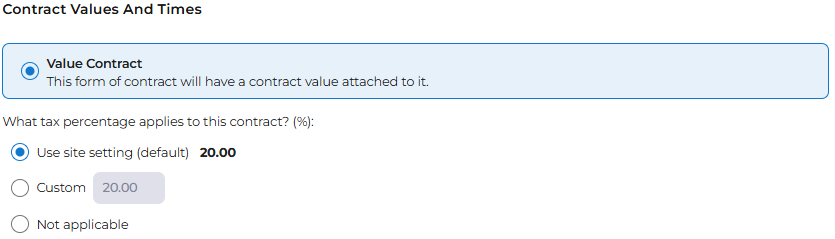
Contract record

This feature enables users to manage the tax percentage on a record-by-record basis within the Contract module.
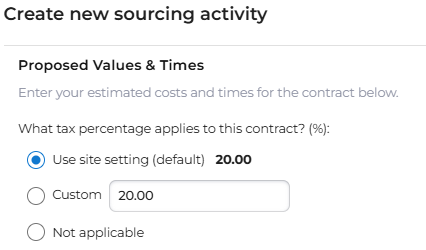
Sourcing record

This feature enables users to specify a tax percentage for each individual sourcing record, rather than relying solely on the default percentage defined in the site settings.
<<Line Space>>
Delegation of Authority (DOA)
Global Financial DOA

Delegation of Authority functionality is now available in both the Sourcing and Contract modules.
DOA - Disable Request Button if previous action is rejected

Previously, if a DOA process had started and an action in the sequence was rejected, users could still proceed to the next step. This update changes that behaviour.
From this release, when an earlier action in a configured sequential process is rejected, the Request button for the subsequent action is now disabled. This ensures users cannot progress until the rejection is resolved, maintaining process integrity.
Contract Module - Apply Delegation start process
This feature addresses the visibility of the Start/Restart button on contract delegation in the Contract module.
When this toggle is enabled, the 'Start Process' & 'Restart Process' functionality is applied for the non-DOA delegation process. When it is disabled, the functionality is not applied.
Sourcing module DOA - Whole of Life (Request Only)

When this feature toggle is enabled, the calculation used to determine delegates has been updated to use the Whole of Life Sourcing Activity (Value including Tax + Options including Tax).
<<Line Space>>
Supplier Module Changes
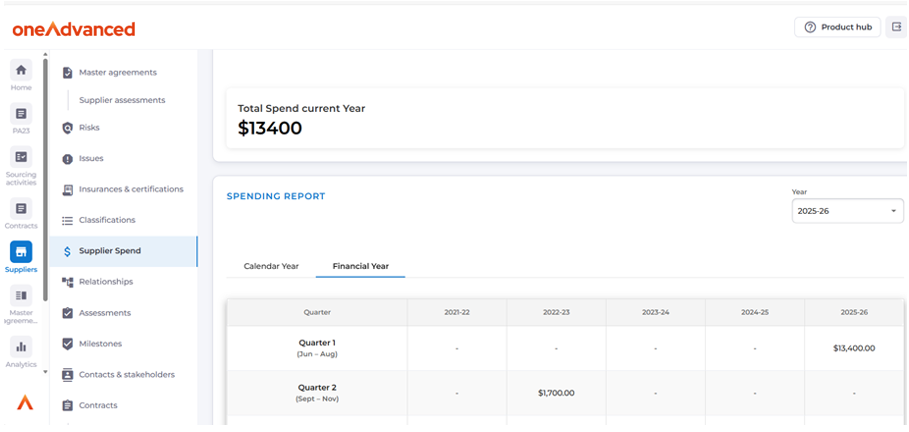
Supplier Spend Data

When the Supplier Spend Data toggle is enabled, the Supplier Spend tab becomes visible in the Suppliers module.
When the toggle is disabled, the tab is hidden.
Currently, no data is displayed in the Supplier Spend area. However, middleware integrations can be configured to push supplier spend data into this tab at any time, supporting future analytics and reporting requirements.
This article provides more information on Supplier Spend.
Unique ERP IDs

Prior to this release ERP IDs could be added to multiple suppliers.
From this release, ERP IDs will be unique across Suppliers within a single site.
<<Line Space>>
Contract Module Changes
Foreign Currency (Request Only)
Foreign currency functionality is now supported within the Contract Module. With the feature enabled, contracts can now be converted to a local currency for reporting and budgeting purposes.

This article provides more information on Foreign Currency.
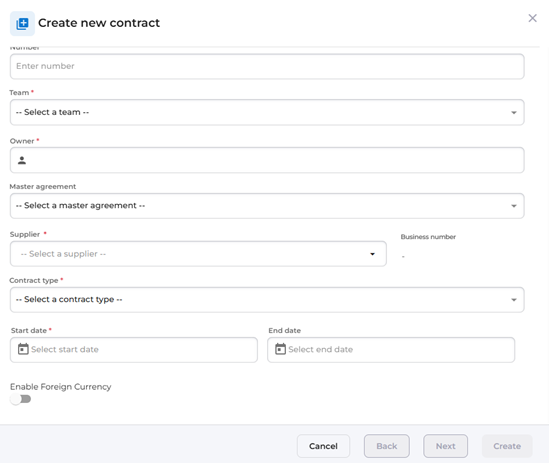
Contract Form - Mandatory Contract Type

When users set up a contract for management, the contract type field is now mandatory and appears in the contract creation wizard.
<<Line Space>>
Restriction on user selection in Owner / Manager fields (Request Only)
When this feature is enabled, the system restricts user selection by role;
- Only users with the role Contract Owner can be assigned to the Owner field within a Contract.
- Only users with the role Contract Manager can be assigned to the Manager field within a Contract.
- Only users with the role Sourcing Owner can be assigned to the Owner field within a Sourcing Activity.
- Only users with the role Sourcing Manager can be assigned to the Manager field within a Sourcing Activity.
<<Line Space>>
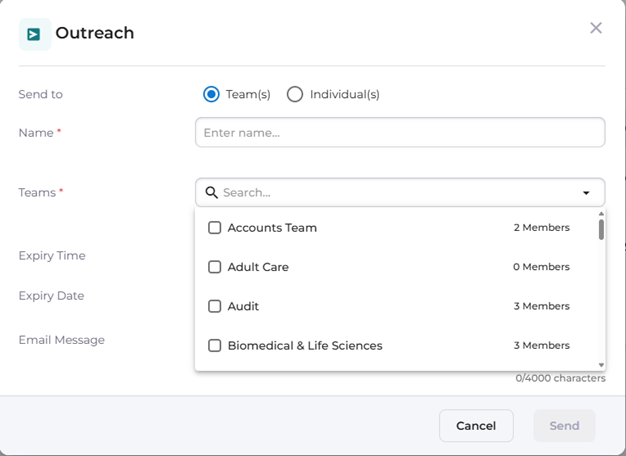
Team size in Outreach Team dropdown

Building upon the feature from the previous release which introduced the ability for system administrators to email members of all teams, or selected teams, with a link to the contract creation form; this enhancement enables System Administrators to view the number of members in each team when sending outreach requests.
<<Line Space>>
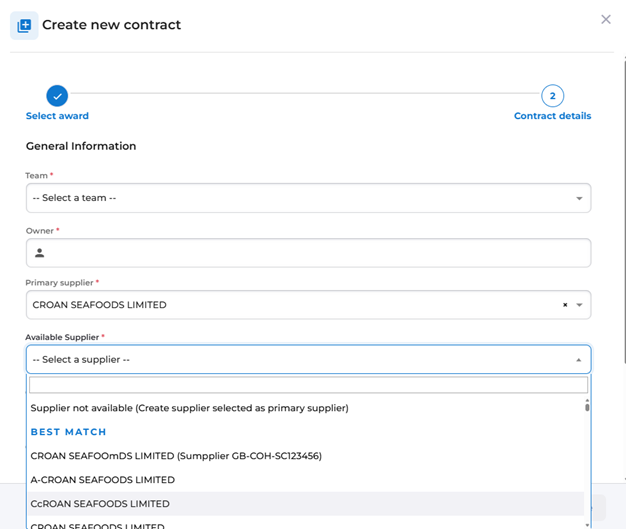
Supplier Number Handling

This feature improves the handling of suppliers imported from the FTS via UK6 notices for contract creation in S2C.
Validation logic has been introduced during contract creation to prevent duplicate supplier records in S2C. The validation is based on the supplier’s name and the scheme ID linked to the OCID.
With this enhancement, imported suppliers are accurately matched, allowing users to either merge with existing supplier records or create new ones as required. This ensures a smoother contract creation process and eliminates the risk of duplicate entries.
<<Line Space>>
Contract Activities Changes

This update introduces full activity management within contract records, enabling users to manage more complex, non-recurring activities for a contract - matching the functionality already available for Supplier and Sourcing Activities.
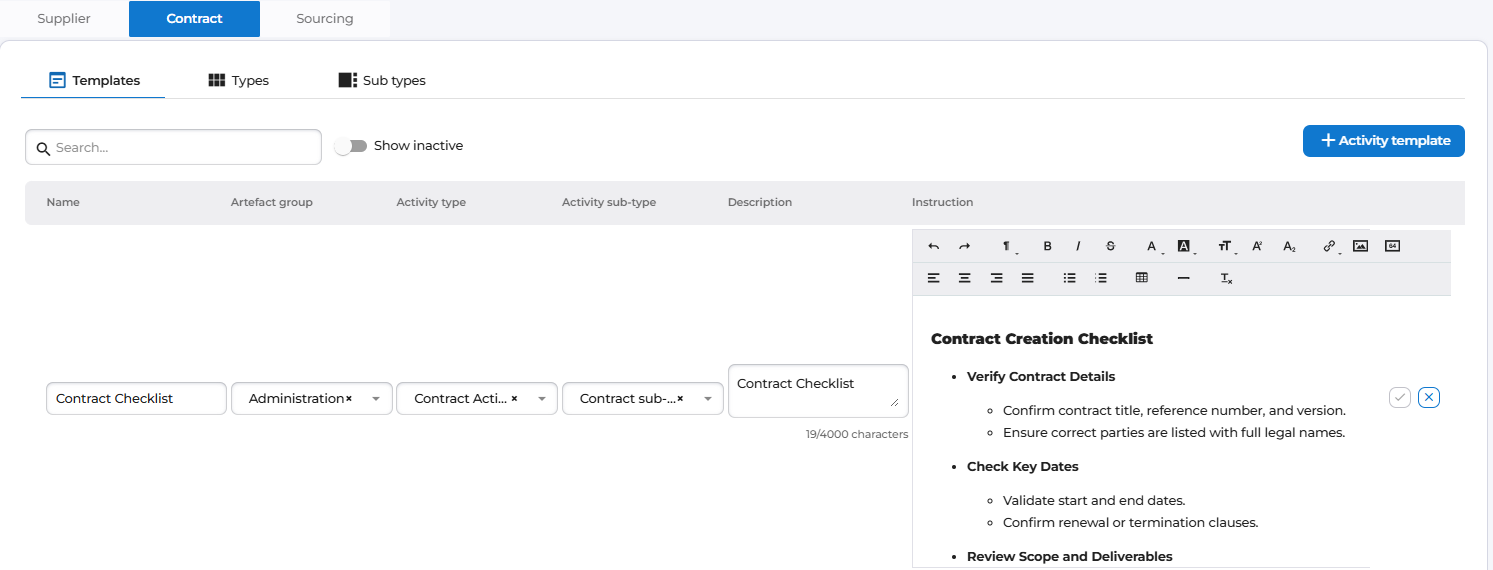
Contract owners and managers can now manage activity templates, phases, and assignments directly within a contract record.
When this feature is enabled, contract activity functionality becomes available.
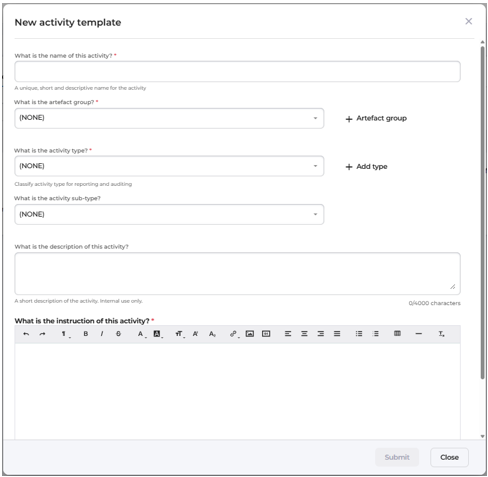
System administrators can configure activities by navigating to Configuration → Activities → Contract, where they can create and manage activity templates and define artefacts, types, and sub-types tailored to their organisation’s needs.
Who Benefits:
- Contract Managers, Category Managers and Procurement Leaders
Benefits
- Improves compliance and policy adherence
- Improves depth of information and documentation associated with contracts.
Creating a new activity template from the command centre:
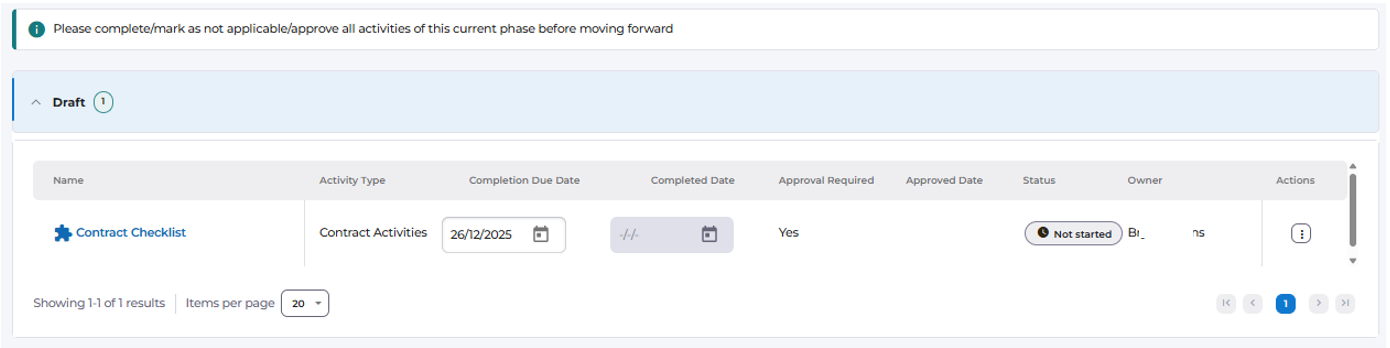
Contract tab within Activities:
Activity Management within Contracts
Activity records are now displayed in a clear, grid-based view grouped by phase (Draft, Executed, Completed, Terminated). Contract owners can add, delete, or complete activities, with status updates reflected in real time.
The functionality mirrors the sourcing module, allowing multiple activities per phase within the contract process template and providing full visibility of tasks across each stage of the contract lifecycle.
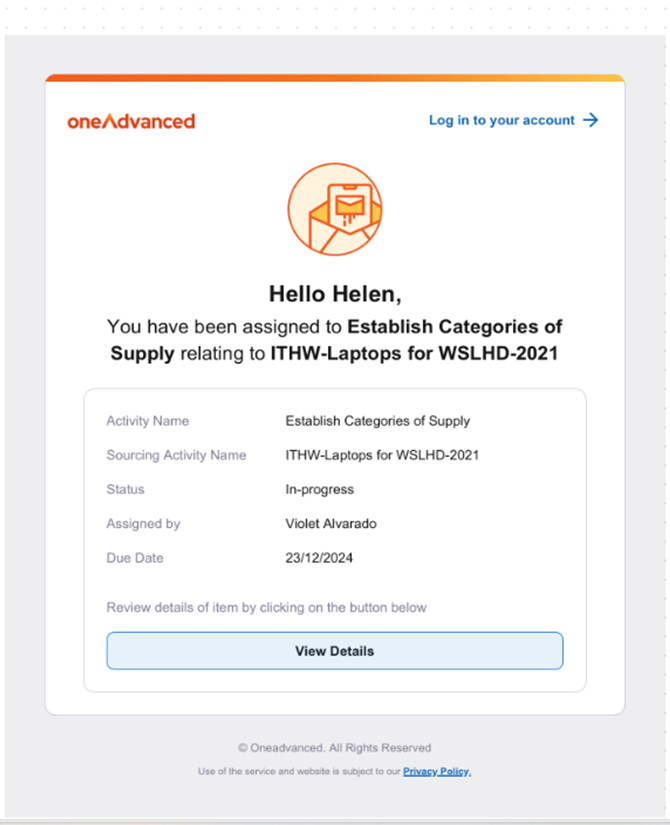
Email Notifications and Assignments
When a contract owner assigns an activity to another user, the assignee will now receive an email notification with a direct link to the task.
This enhancement ensures visibility and assists with on-time activity completion through clear task communication.
Notification that an assignee receives:
Process Template
When a contract process template includes activities, the system will automatically generate phased activities as the contract progresses.
- Activities for the Draft phase are created upon adding the process template.
- Activities for subsequent phases generate automatically as preceding phases are completed.
- Activities in previous phases are locked for edit; their fields and actions are read-only to ensure data integrity.
- Changing the process template is allowed only during the Draft phase. When changed, the system deletes old activities and regenerates the new set of activities associated with the new process template.
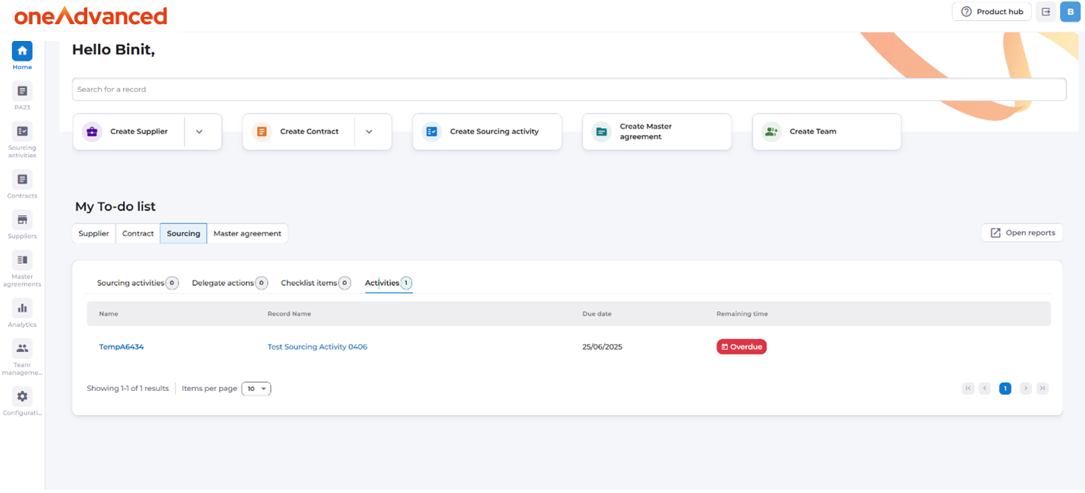
Action Centre Assigned Tasks
Assigned contract activities are now visible in the Action Centre (home page).
Users can view their pending activities and access them directly from the notification list, making daily task management more efficient—similar to the Sourcing Action Centre.
Progress Tracking
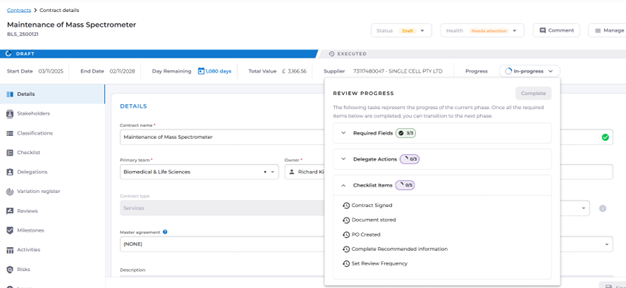
The contract “Progress” Dropdown has been enhanced to display the status of associated activities and identify pending items required to move the contract to the next phase.
Statuses update automatically as users' complete activities, providing a transparent view of contract readiness and overall progress delivering an experience consistent with sourcing activities.
Progress bar includes activities and pending items:
<<Line Space>>
Sourcing & Supplier modules - Grid User Interface Update

A new configuration toggle has been introduced to enable the redesigned Activities tab in the Supplier and Sourcing modules. When enabled: The updated UI for the Activities grid is displayed in both Supplier and Sourcing activities.
When disabled: The previous UI remains in place for these modules.
This feature provides flexibility for organisations to adopt the new design at their own pace.
- Updated Look & Feel: Cleaner grid layout, improved spacing, and advanced theme details for a consistent experience in both light and dark modes.
- Better Usability: Wider activity type columns prevent text from being cut off, and everything stays aligned—including the icons and buttons
- Dropdown Improvements: Easier to use, with clearer icons and more space for each option.
- Easier to Read: New colour palettes and badge designs that match modern accessibility standards.
<<Line Space>>
Contract Variations - Automatic Numbering

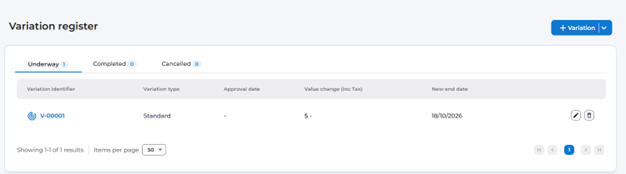
Contract variations now receive an automatically generated sequential identifier.
When a new variation is created, the system assigns the next available number based on existing variations within the contract. If a higher manual number already exists, the sequence adjusts accordingly. Once submitted, the variation number becomes read-only, ensuring consistency and preventing accidental changes.
<<Line Space>>
Contract Process Template - Configuration Update
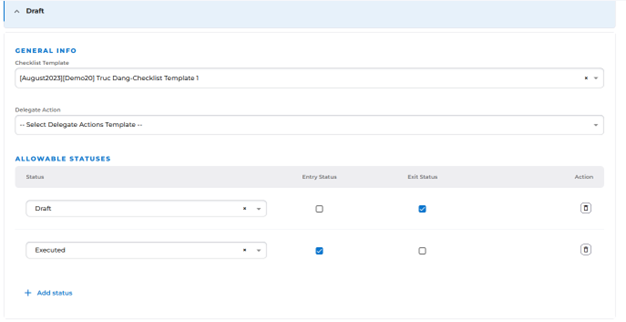
Previously, when configuring a Contract Process Template in draft mode, the system enforced a rule requiring the exit status of the Draft phase to exactly match the entry status of the Executed phase.
This validation has now been removed.
Users can define the allowable status for the Draft phase independently, enabling more flexible and customisable contract process templates