May 2025

Release Notes for S2C Release 3
This release includes new features, improvements, bug fixes, and other changes.
Features are categorised according to subscription tiers: Starter, Standard, Pro/Graduation. Higher tiers encompass the features of the preceding tiers.
Items marked with ‘Feature toggle’ are optional and can be activated by a support request, ensuring that new features are rolled out in a controlled manner, and only if required.
Introduction
Features are divided by the Roles and Jobs that they serve – represented in this document as management of the major elements of the product – Supplier, Contract and Sourcing.
Not all release features apply to every license. The license tier that a specific feature is available in will be included in its description, using one of the following icons.

In line with our Product Priority roadmaps, features will also be tagged based on their impact, using the following icons.
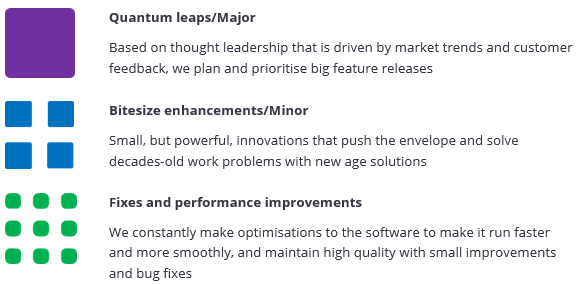
Some features require an additional license above and beyond the product license tiers listed above. In these instances, it will be clearly identified.
Supplier Management
Updated Contract Register on Supplier records

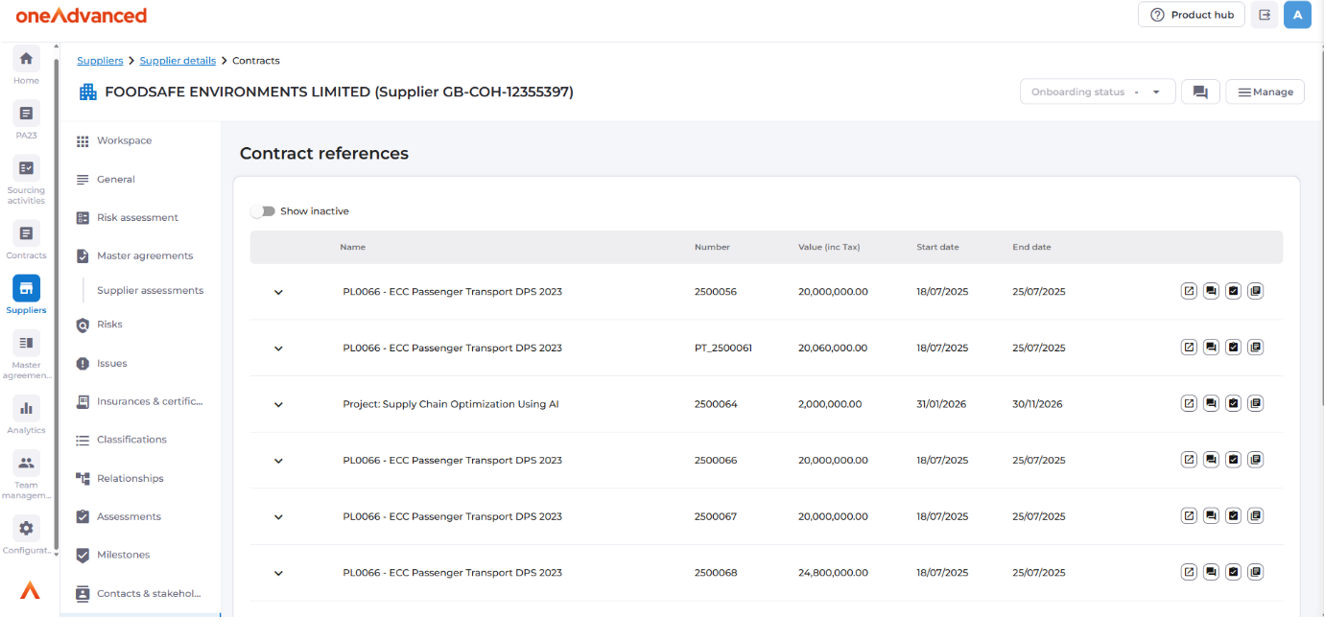
The contract register in supplier records and master agreements will now respect a user’s permissions, which are determined by their team access and roles assigned.
- Users will no longer see the 'Restricted' flag on contracts on suppliers and master agreements, instead they will see the appropriate values.
- Users will only see the records to which they have access, determined by the team(s) they are in.
- Comments are module restricted – comments made in the supplier record against a contract will only be viewable from the supplier record.
Companies Registration Office (CRO) for Supplier creation
Companies Registration Office will now be an optional external system to search for companies registered in Ireland when creating a new supplier.
New Role: Supplier Assessment Owner

A system wide role (non-team based) that allows a user to have full control over the creation and completion of Assessments for Suppliers, but read only access to core Supplier information such as supplier details, supplier contacts, documents and contract register.
Contract Management
UK Procurement Act 2023

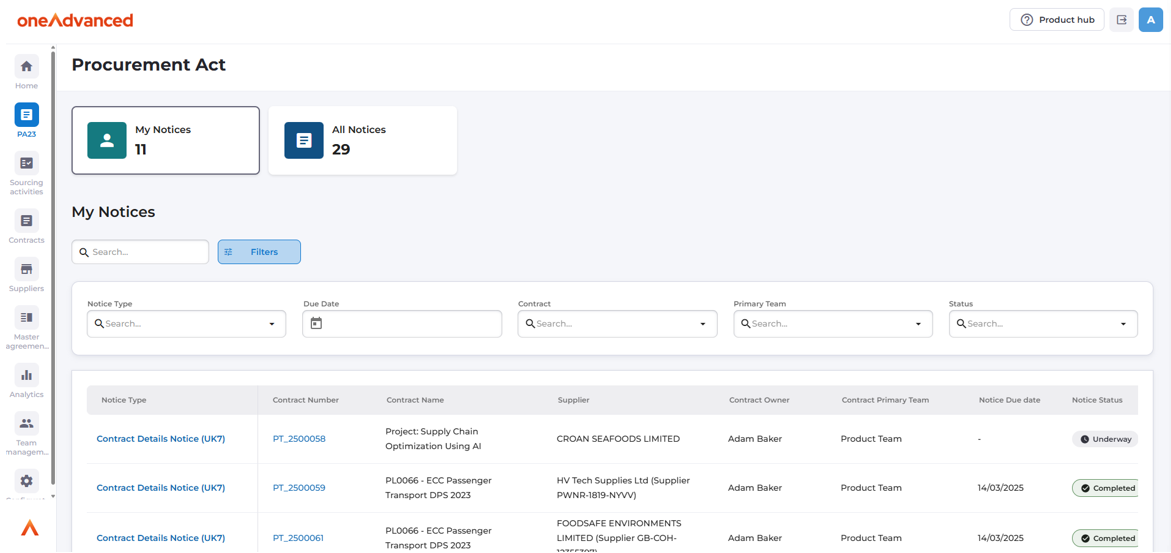
The first component of the Source to Contract Procurement Act solution is included in this release. This feature is intended to operate alongside any existing tendering tools your organisation may have to allow you to undertake the elements of Contract Lifecycle management that the Procurement Act expects of contract managers.
Key components of this feature include:
- Generation and publishing of UK7, UK10 and UK11 notices.
- Workflow driven generation of notices – the system will know when a notice is required and ensure the user is aware of what is required.
- Creation of Contract Records and Supplier Records based of previous notices
- Linkage of Contract Management Notices to previous notices in the procurement process.
- Dashboards for oversight into notice status and compliance adherence.
- Notifications to users when notices are required, generated and due.
- In app guidance to help users understand their compliance requirements, as well as understanding why a notice is required.
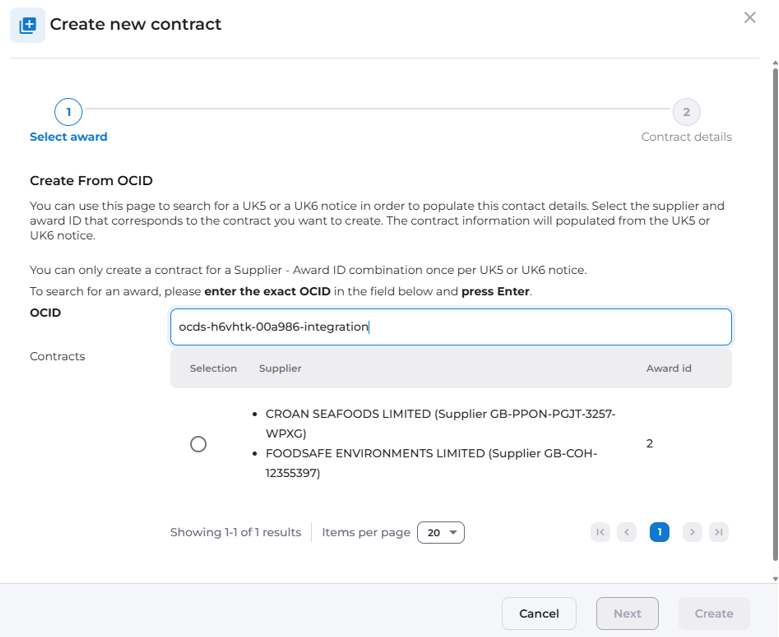
Creating a contract record from an existing notice already published to FTS.
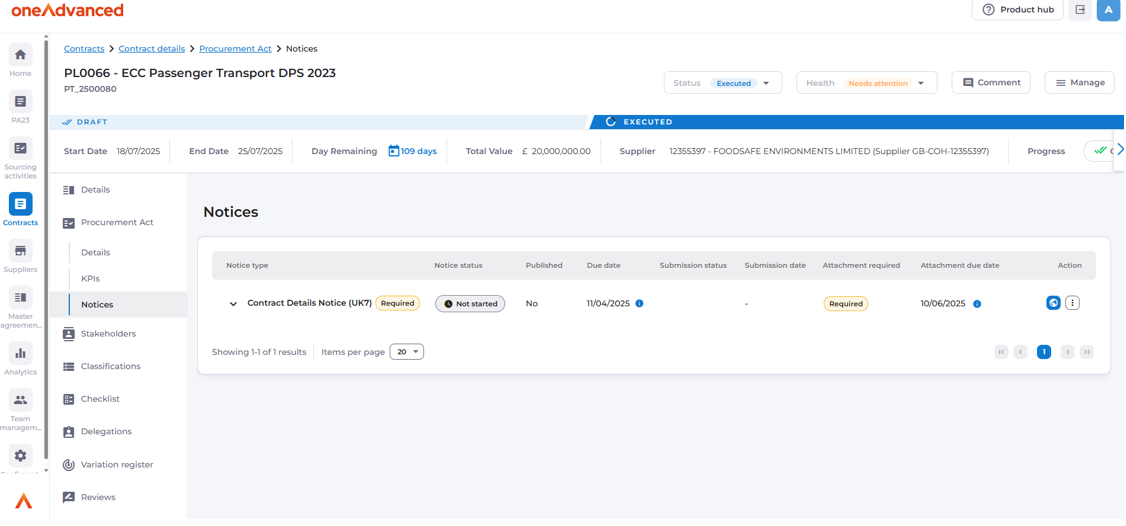
A notice generated for a contract awaiting publishing.
More detailed information on the Procurement Act is available in the Product Hub, accessible via the button in the top right hand of every screen within Source to Contract or directly by clicking here.
Contract Outreach

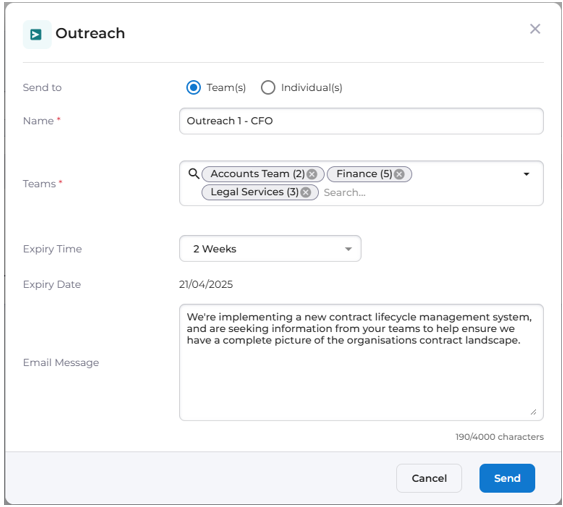
System administrators can set up a process which will send an e-mail to members of all teams, or specified teams, which will contain a link to a contract creation form.
- Useful when onboarding new business areas or getting data into a newly setup system.
- Assists with migrations when an initial data load is known to be incomplete.
- If the users in the teams do not have the Contact Owner permission, they will temporarily be granted the role to allow them to create contracts.
The outreach function is accessible from the Command Centre.
Contract Time and Value updates

New fields added for dates and values
- New fields will display the maximum value and end date of the contract including options
- Future Signature Date
- Signed Date
Enhanced Contract Permissions for System Administrators

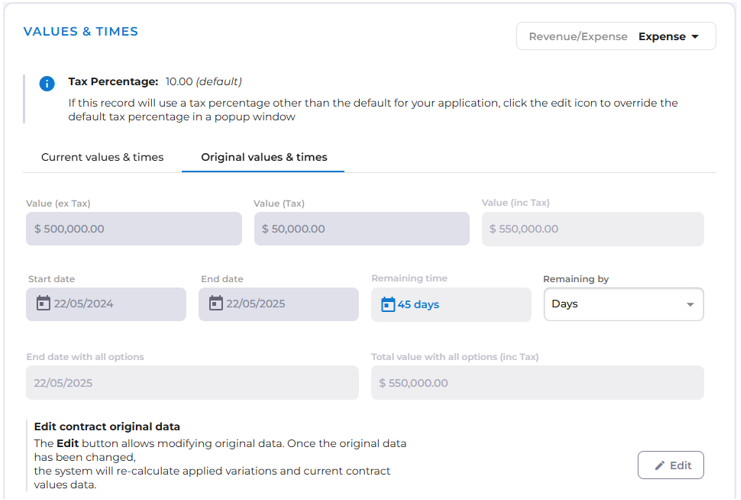
System administrators can edit the original values of a contract using a new dialogue box.
- Allows system admins to edit original contract values using a confirmation dialog.
- The contracts current values will recalculate, considering any applied variations.
- This feature will not appear on Procurement Act enabled contracts.
Sourcing Management
Note: These features are included in the Source to Contract Plus license, a new offering which will become available in calendar Q2 2025.
Custom Phases for Sourcing Activities

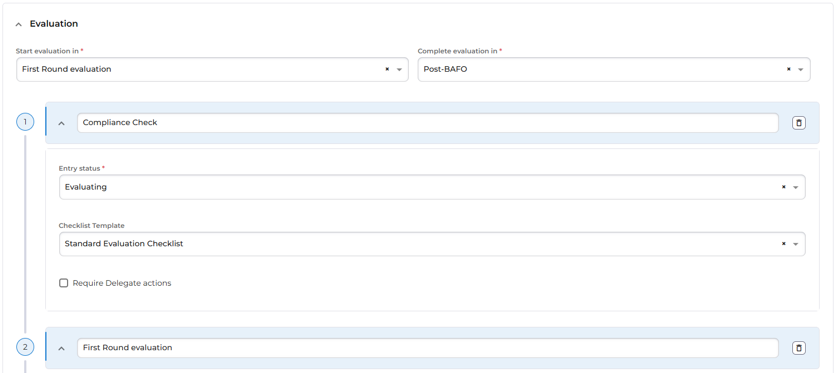
When configuring sourcing activity process templates, additional phases can now be added to allow for greater flexibility in how process templates can represent real world processes and projects. As each phase has a key action associated with it, users can also identify in which phase the key action should commence, and where relevant in which phase it can be completed.
- New phases are aligned to the Planning – At Market – Evaluate – Outcome progression.
- Which phase key actions should be available in.
- Add checklists and delegate actions to each custom phase.
Updated user interface for Sourcing Activities

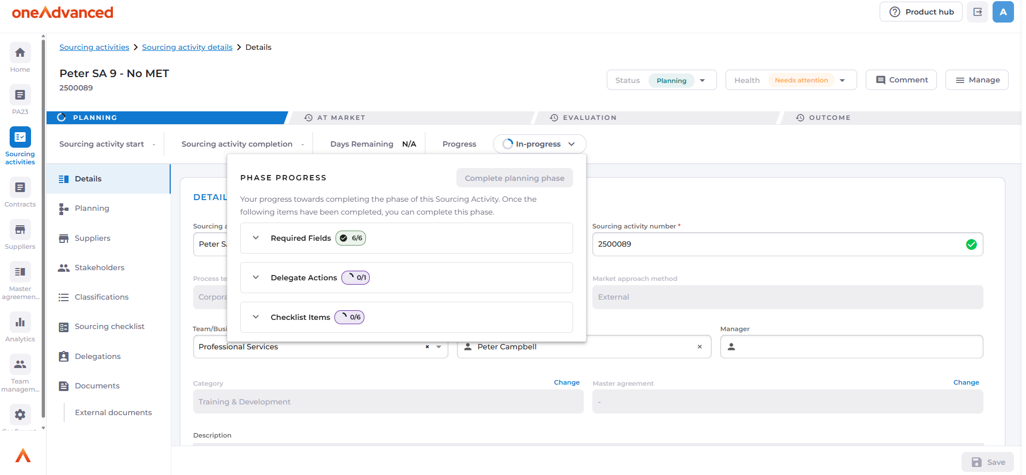
To support the custom phases, the user interface in sourcing activities has been updated to show users their progress through the overall process, as well as to clearly identify what tasks and actions are required of them in the current phase.
The method of progression between phases has been improved and brought in line with the experience found in contracts to ensure a consistent experience across all workflow enabled modules.
- Dynamically resizes based on number of phases in the process template.
- Shows user progression through entire process.
- Easily review outstanding tasks, actions and data requests via the top bar.
Supplier / Market Engagement Updates

Suppliers can be invited to an opportunity by using their e-mail address, rather than requiring a supplier record to be created for them.
- The suppliers unverified supplier record will be created if the supplier accepts the invitation to register.
Suppliers will now receive an e-mail indicating a successful submission upon submitting a Quick Quote response form.
The suppliers tab of an Opportunity Hub enabled sourcing activity will now show a tally of how many suppliers have responded against those who have indicated an interest to respond.
Default Open/Close dates for quotes and tenders to 8:00AM and 5:00PM
Sourcing Activity changes

Enable payment model selection on a sourcing activity
- This provides the ability to indicate the model, method or trigger for payment to suppliers.
- Configured at Sourcing Data\Payment Models by Administrators.
Remove the requirement for an Assessment to be associated with an Evaluation Methodology
- An evaluation methodology must still be selected for a Sourcing Activity
- An outcome must still be selected for each supplier who progressed to evaluation.
- Configured at Assessments\Sourcing\Evaluation Methodology by not selecting an assessment for a Methodology.
[Feature toggle] Restrict the completion of a sourcing activity if the health check is not green.
[Feature toggle] Require the minimum number of suppliers specified in the process template to be added to a sourcing activity before the planning phase can be completed.
New Role: Master Agreement Assessment Owner

A system wide role (non-team based) that allows a user to have full control over the creation and completion of Assessments for Master Agreements, but read only access to core Master Agreement information such as General Information, associated suppliers, contact information and the contract list.
General Updates and Quality of Life
Report Builder
Requires additional licenses.

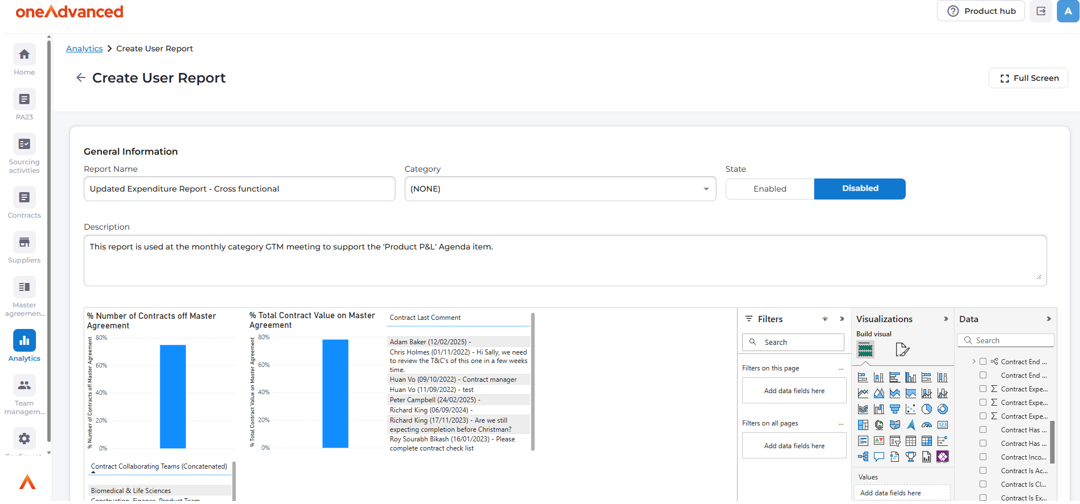
A powerful feature that enables users with the appropriate permission assigned to them the ability to create new PowerBI dashboards as well as manage existing dashboards directly from the Analytics tab.
Core record data, as well as data specific to your configuration can be combined to produce reports in minutes.
- Create, edit and publish dashboards directly to your site’s Analytics tab
- Clone existing dashboards to use as a starting point.
- Group and categorise dashboards
- An updated UI for the analytics tab to take advantage of the new functionality.
Please note: Some level of PowerBI experience is recommended for this feature, as the report building interface is an embedded version of PowerBI.
Multiple file uploads via Drag and Drop

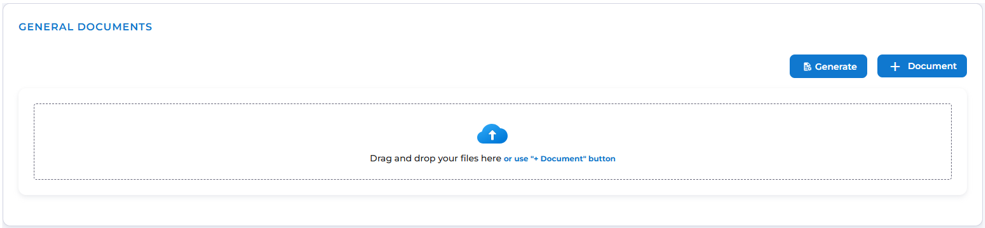
Any record with a ‘General Documents’ container can now have multiple documents dragged to it, rather than requiring them to be uploaded individually.
- The documents can be categorised after uploading them as normal.
- Multiple file types can be uploaded at the same time.
- The files will automatically upload once dragged into the box.
Workflow Updates

Progressing through a records process template will automatically update the records status with the appropriate status for the phase.
- This helps to ensure that records, registers and reports will give the most accurate reflection of each records progress.
The assignees for delegate actions can now all be pre-selected before commencing the request process, reducing clicks and saving time.
A checklist task can now have its status reverted to an ‘incomplete’ status.
- This helps to avoid applicable checklist tasks being marked as not applicable.
Data Updates

Cost Centres can now be associated with Teams.
- If a team has cost centres associated with it, any records created will have their cost centre breakdown restricted to that teams associated cost centres.
- Parent teams, as well as collaborating teams are considered, and their cost centres can also be selected for the record.
Field in site settings to specify your organisation or site name.
- This is used in e-mails to externals to ensure they are aware of who the e-mail has come from.