September 2024
Release Notes for S2C Release 2
This release includes new features, improvements, bug fixes, and other changes.
Features are categorised according to subscription tiers: Starter, Standard, Pro/Graduation. Higher tiers encompass the features of the preceding tiers.
Items marked with ‘Feature toggle’ are optional and can be activated by a support request, ensuring that new features are rolled out in a controlled manner, and only if required.
Features for ‘Starter’ and Higher
Action Centre Update
The latest update to the Action Centre streamlines task management and enhances user experience. With an efficient new layout, tasks are now segmented by module, allowing for a more organised and focused approach to work.
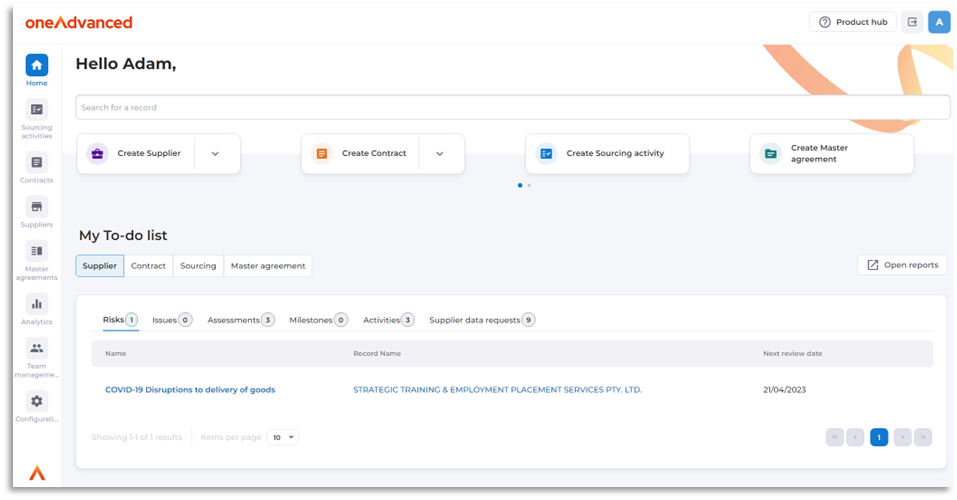
The placement of search and creation buttons at the top of the view provides quick and easy access to essential functions, saving time and reducing clicks. Additionally, the search tools functionality has been broadened to search record numbers allowing for a more flexible and comprehensive search experience.
The redesigned "To-do list" maximises screen width for an improved viewing experience and categorises tasks by module, allowing for a more organised and focused approach to work.
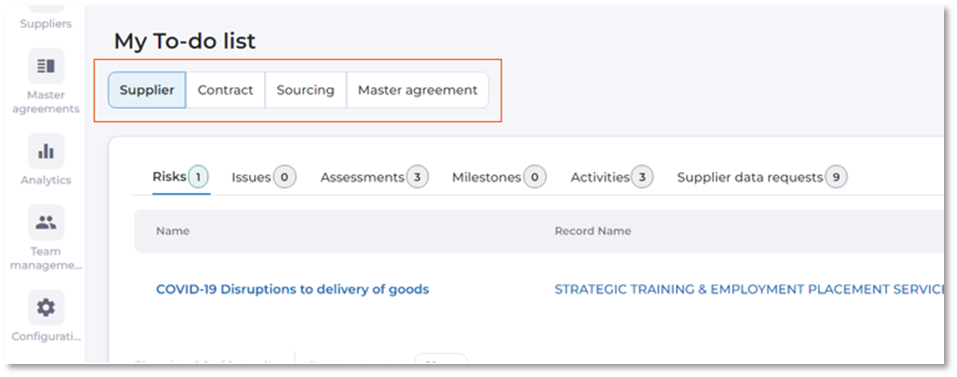
Overall, these improvements are designed to facilitate a more intuitive and productive workflow for users.
Data Import Feature (Suppliers)
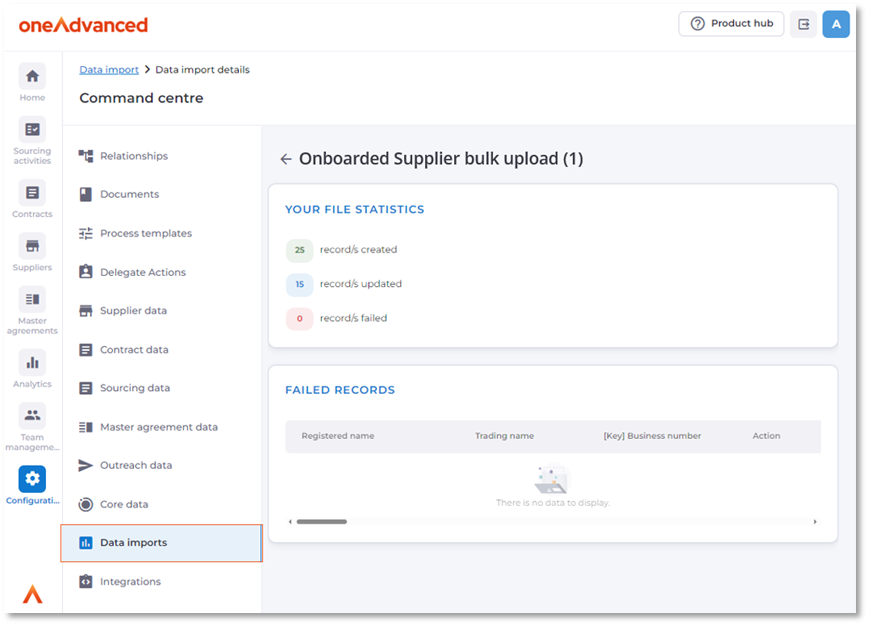
The new feature streamlines the process of integrating data from various source systems, empowering administrators with the ability to import records and data in bulk. This not only saves significant time but also reduces dependency on the services team for such tasks.
Initially, this feature supports the import of supplier data, with plans to expand its capabilities to include more data types in subsequent releases.
The 'Data imports' option, located in the Command Centre, provides a user-friendly interface for administrators to manage the import process. A downloadable CSV template simplifies the data preparation, and upon uploading, the system notifies the user of the import status, detailing successful entries, updates, and any failures.
Deactivate Teams
The team management module has been enhanced for system administrators, expanding the management options of team structure.
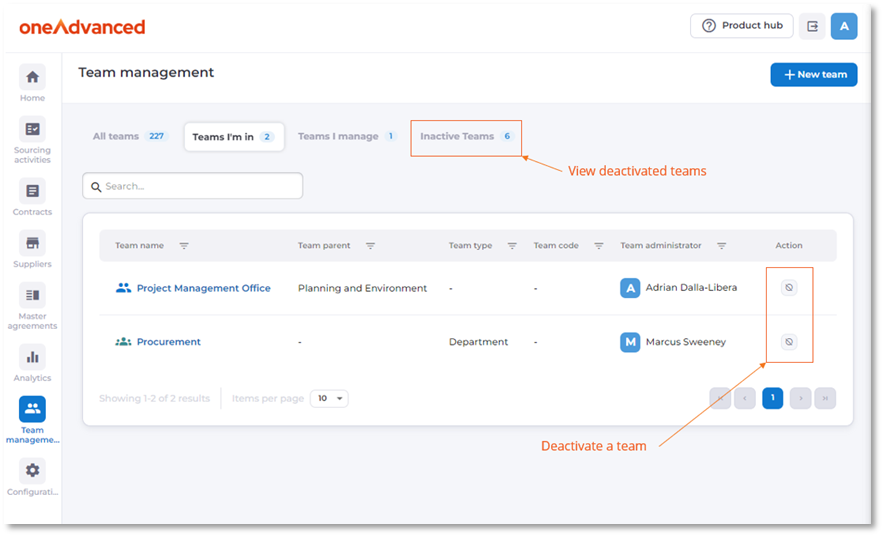
With the new update, administrators can deactivate teams with a single click, which automatically identifies and provides options for parent-child relationships within teams. This feature gives administrators, the flexibility to deactivate a parent team individually or include its child teams.
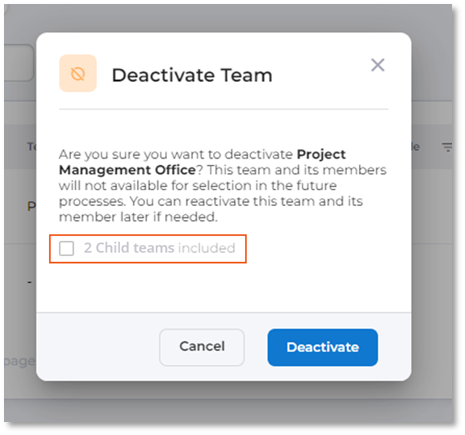
Additionally, a new view has been introduced to review deactivated teams, maintaining the same intuitive control for parent and child reactivation and providing efficient team management within the system.
Enforce Strict Breakdown Validation
The 'Enforce strict breakdown validation' feature is a crucial control mechanism for administrators to ensure that the financial aspects of sourcing activities* and contracts are kept within budget.
This feature can be enabled per process template, and influences attached sourcing activity* and contract ‘Types’. It enforces the values within the Breakdown section, to not exceed the total allocated value.
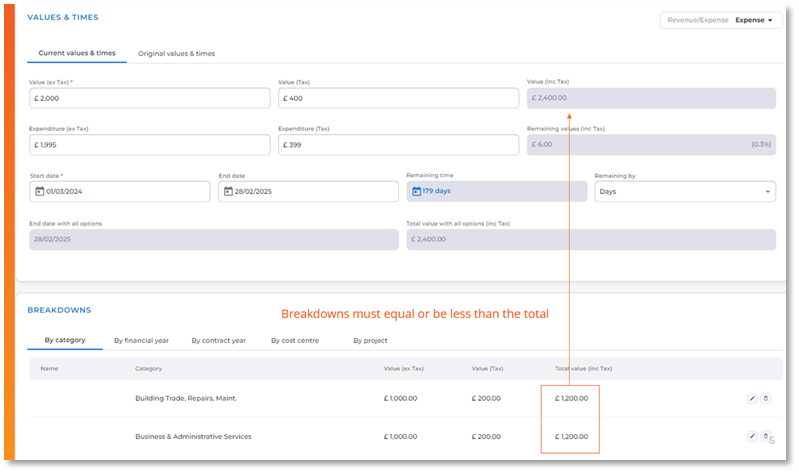
Additionally, the feature safeguards against reducing the total value below the sum of the breakdowns or changing the contract type from one without strict validation to one with Strict validation and overspending has occurred.
One Advanced Solidarity in UI Theme
The new ‘OneAdvanced’ theme will replace all ‘Portt’ related themes. This change aims to unify the brand and streamline user experience across all platforms.
Users will still retain personalisation capabilities, with the ability to adjust width fluidity and select a Dark mode via the 'Appearance' settings, catering to individual preferences and enhancing visual comfort.
Contract Deletion Change
Due to overwhelming feedback, only users with Administrator privileges can now delete contract records.
This measure safeguards against accidental deletions but also serves as a deterrent against malicious attempts to disrupt contract probity.
Additional Contract Statuses
Three new statuses have been introduced, to the contract view status dropdown, to enhance the tracking and management of contracts:
• Under Variation
• Completing
• Terminating
'Under Variation' automatically applies when there have been variations to the original contract terms, while 'Completing' and 'Terminating' clearly communicate the contract's progression to concluding states, improving overall visibility in the dashboard and overview screens.
Milestones Missing from Action Centre
The addition of Action Centre notifications for milestones addresses a crucial gap in sourcing and contract management. With this update, milestone owners can stay informed about approaching dates, ensuring that key milestones are met. This enhancement aligns milestones with other artefacts, streamlining the user experience.
Compatibility for Macro-enabled Excel files.
The platform now allows macro-enabled Excel files (.xlsm) to be uploaded to various document sections in the platform. While useful for automating tasks, these files may pose security risks if they contain malicious code. Users should be wary of macros in files from unknown sources and adhere to best practices for security, such as consulting IT support in case of suspicion.
DUNs and VAT numbers for Suppliers
Additional DUNs and VAT number selections are available in the 'Identification numbers and Codes' section of the supplier's details, allowing for more detailed supplier profiles.
Features for ‘Standard’ and Higher
Adobe eSign Functionality for Sourcing and Contracts
Toggle Feature
Adobe's eSign feature is a robust integration option that enhances document management efficiency within sourcing activities and contracts.
With an active Adobe eSign subscription, users can activate eSigning capabilities for attached documents, streamlining the approval process. This functionality empowers sourcing activity and contract owners to initiate eSigning for any document, select signatories, and provide clear instructions for signers.
The feature's design prioritises transparency and accountability, as it tracks the progression of signatures and records signature dates through a user-friendly interface, ensuring a comprehensive audit trail.
The integration of eSign technology into workflows not only saves time but also reinforces the security and legality of digital agreements.
Features for ‘Pro/Graduation’
Supplier and Contract Triggers
The new trigger system for Contract and Supplier records is a significant advancement in automating communications, to both internal and external recipients.
Users now can create triggers that automatically generate emails for various stakeholders, as a one-time notification or for recurring messages.
For contracts, the feature allows for precise scheduling around contract start and end dates, ensuring that owners and managers can be targeted, as well as internal or external recipients.
Similarly, supplier-related communications can be streamlined, targeting the supplier owner, or other internal and external recipients.
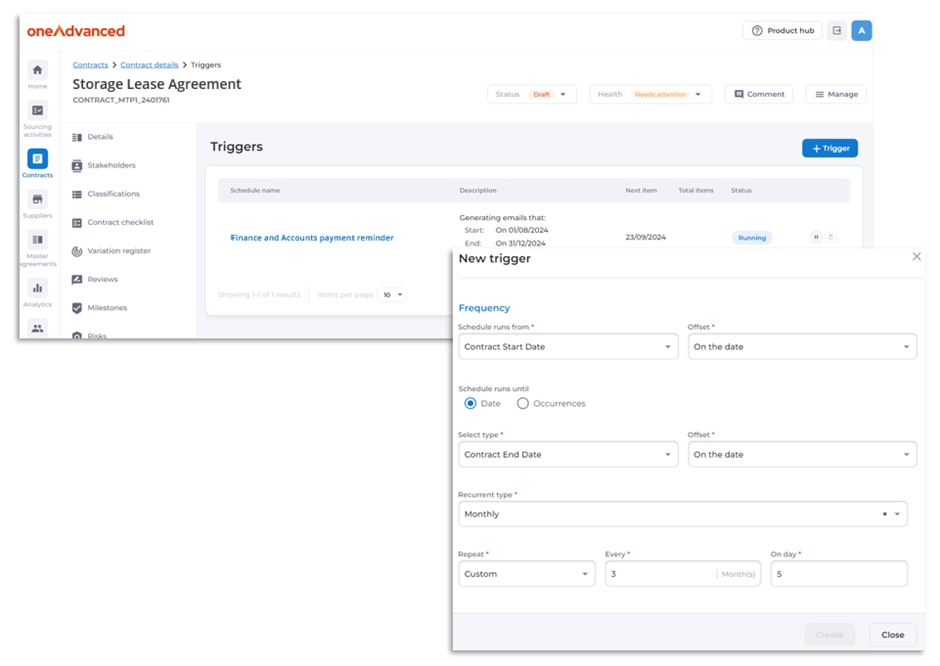
The added flexibility in scheduling, with options for date offsets and intervals, as well as the ability to terminate after a certain number of occurrences, provides users with robust control over their email notifications.
Moreover, the functionality to monitor the status of triggers and the power to pause or cancel them as needed empowers users to manage their communications proactively and responsively.
Award Wizard Enhancement
When awarding contracts in the outcome stage of a sourcing activity the award wizard will automatically fill in essential contract details such as the name, number, primary team, and owner, drawing from the data entered during the sourcing activity. This not only saves time but also reduces the likelihood of human error. However, if required changes can still be applied manually to these fields.
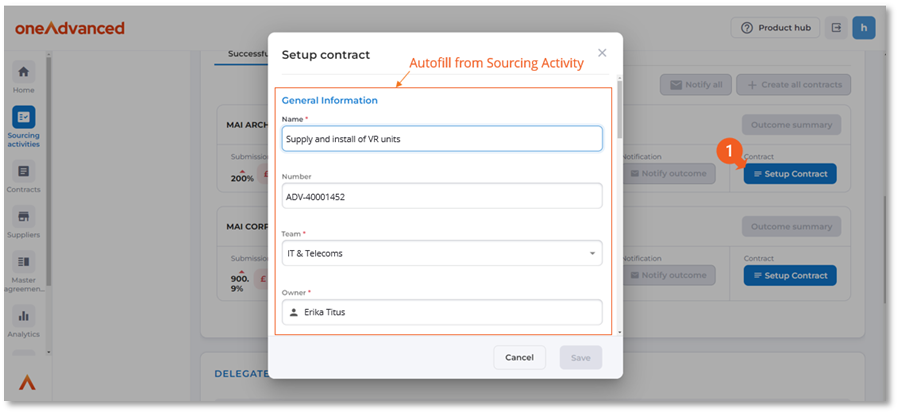
Additionally, validation occurs ensuring that only individuals with the appropriate permissions are assigned as contract owners. For scenarios involving multiple contracts awarded, the system intelligently suffixes an alphabetical sequence to each contract number (_A, _B, _C,..._Z, _AA, _AB, etc.).
Lastly, the automation extends to the contract value, defaulting to the successful supplier's submission value, further simplifying the contract awarding stage.
S2C to Portt 1.50 Contract Award Integration
Toggle Feature
This feature specifically addresses hybrid environments where Source to Contract is being used in combination with Portt 1.50.
By request only, when enabling this feature, users can initiate sourcing activities within the Source to Contract platform, ensuring a seamless transition through the procurement stages.
During the 'Outcome' phase, the awarding of the contract triggers the creation of a new contract record within Portt 1.50's Contract module.
The generated contract in Portt 1.50 retains a connection to its origins through a reference link to the sourcing activity, and vice-versa the contract listing in the ‘Outcome’ phase of Source to Contract links to the contract. These links are crucial as it maintains the traceability and transparency of the procurement process.